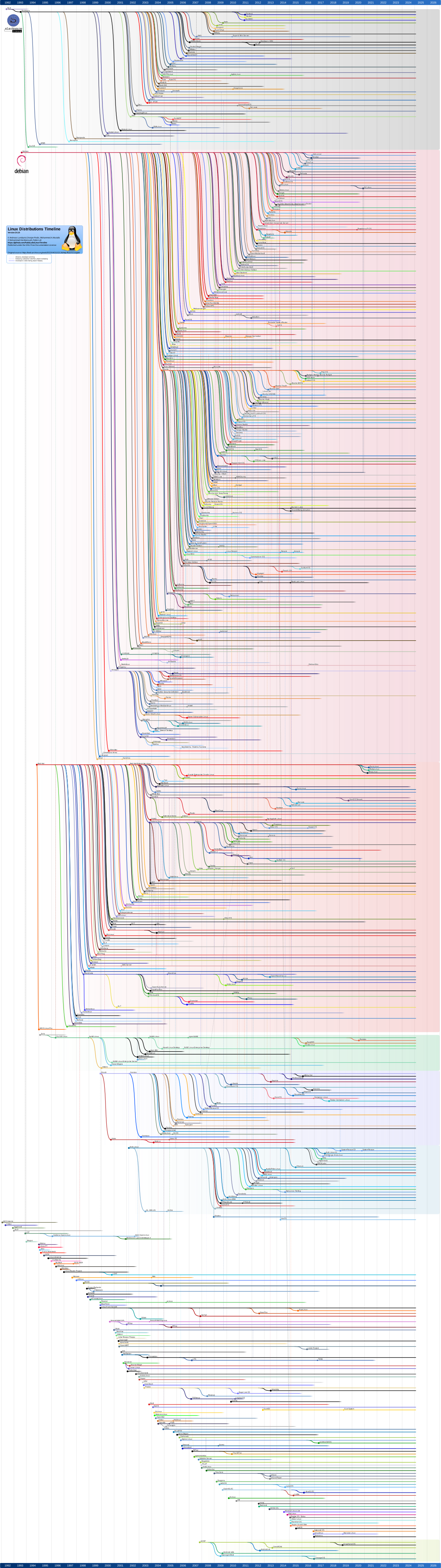
most distros are built on top of a handful of core distros
these core distros are: arch linux, debian, red hat (fedora), slackware, opensuse, & gentoo
if you don’t want to throw yourself into an ocean level deep end, i would suggest not starting with slackware or gentoo
that leaves you with:
- arch linux (bleeding edge up-to-date blank slate to shape to your liking) use the archinstall script your first time
- debian (famously stable at the cost of v slow updates) installer doesn’t feel terribly modern but works
fedora(neat distro but meaningfully propped up by red hat, a subsidiary of ibm - a publicly traded company)opensuse(another distro beholden to a for-profit company - this one owned by private equity)
unless you have a specific use case, i suggest you pick one of these four (& i would also avoid fedora and opensuse)
a distro being built on top of another (or even several) distro(s) slows updates and raises the chance of complications
rolling release vs stable release distros
- arch, for example, is rolling release
- each package makes updates available right away when changes are made
- whenever you update, you install all of the updates to any packages which have a new version since your last update
- the upside is that you always have access to the newest versions of all of your software
- the downside is that if there is a bug in a package update, you might snag that version before the hotfix goes out
- additionally, sometimes (~3-4 times a year in my experience) you need to follow some manual steps for an update
- debian is stable release (sometimes called standard release or point release)
- security updates are still made available quickly
- other updates are collected for a period of time and then frozen for a while leading up the next stable release
- during the freeze, testing is done to make sure that all of the updates work well together and bugs are found
- after the freeze, one big update is pushed to users with all of the collected software updates
- the upside is that kinks are worked out, bugs are found, & (other than security updates) you rarely need to update
- the downside is that, with debian (for example) the releases are every ~2 years
- this means that if some software you like adds a cool new feature, you could be waiting a long time to enjoy it
- however, you can get around this by manually installing new versions using self contained packages
specific use cases (and what the associated distro is based on)
- tails (debian) neat privacy focused os that runs off a usb stick for use on a public pc or other people’s computers
- cachy os (arch linux) visual installer for arch linux which also has optimizations if you are on modern hardware
- it is trivial to get the same optimizations on vanilla arch linux and the archinstall script is not much harder
but, of all of the distros built on arch which really just simplify the install, at least this one adds something
- it is trivial to get the same optimizations on vanilla arch linux and the archinstall script is not much harder
- bazzite (fedora) hard to mess up (because of how locked down it is) distro for users who just want to play games
- qubes os (fedora) security oriented os for technical users which offers compartmentalized ‘qubes’
- asahi linux (fedora) the way to run linux on apple silicon mac hardware
- puppy linux (n/a) extremely light-weight distro for hardware that won’t run a normal distro (this is rare)
what’s in a distro? (distro vs desktop environment - abbreviated to de)
the distro gives you:
- pre-installed package manager (where ‘packages’ are your applications and the software libraries they depend on)
- some pre-installed packages (others may be provided by the chosen desktop environment)
- pre-set configuration
the desktop environment gives you:
- the look and feel of your computer
look at kde and gnome for example - you can install either with most distros
kde looks more like windows and is focused on ease of use and customization
gnome looks more like mac and is focused on a clean aesthetic and minimalism
regardless of the distro used, if you pick kde as the desktop environment, the look & feel will be defined by kde - some pre-installed packages (a fully featured de like kde or gnome also provides a full suite of software)
what about those other distros you have seen on lists online or elsewhere?
they aren’t real and they can’t hurt you
but more seriously here are previously unmentioned top distros according to distrowatch (and some extras):
debian -> ubuntu
- controlled by the for-profit company canonical - just use debian
debian -> kali
- debian pre-loaded with digital forensics and penetration testing software - maintained by a for-profit company
debian -> ubuntu -> mint
- often touted as the best beginner pick; v counter to my experience helping friends with it - just use debian
debian -> ubuntu -> pop!_os
- uses the still (as of 2026) v buggy cosmic desktop environment - just use debian with cosmic if you want cosmic
debian -> ubuntu -> zorin
- offers a premium paid version with additional customization options, ew no - just use debian
debian -> ubuntu -> elementary
- i don’t get the obsession with building on top of ubuntu - it’s ubuntu but looks slightly more like a mac
arch linux -> endeavour os
- one of many distros built on arch which basically only serve to make installing easier - use cachyos instead
arch linux -> manjaro
- another distro built on arch which offers little beyond a graphical installer - famously poorly managed - use arch
arch linux -> omarchy
- if you love generative ai and the far right then this is the ‘distro’ for you
fedora -> nobara
- bazzite-lite - not as locked down but still very opinionated & comes set up for games - maybe a good fit for some
nix os
- neat os built around the nix package manager which is configured via a functional programming language
the config generates a complete reproducible profile and is easy to rollback - not for beginners
in short, unless you have a different specific use case or aren’t a beginner:
pick arch or debian for your distro and pick kde or gnome for your desktop environment
for debian with kde, look for a link called ’live kde’ under the ’try debian live before installing’ section here
for debian with gnome, you can find a link called ’live gnome’ under the same section
for arch with either, use archinstall after booting the install media from here and choose the one you desire
if you are /really/ afraid of installing arch, just use cachyos (which also has gnome and kde as options)
p.s. make sure you verify your downloaded iso using the provided sha256 value - look up a guide on how, if needed